Lab Network Diagram
AUD507 Lab Environment
The lab environment for AUD507 is setup to simulate the sorts of systems you might encounter during enterprise IT and security audits. We make use of virtual machines which simulate on-premise systems you might encounter, and systems and resources hosted in AWS and Azure cloud environments.
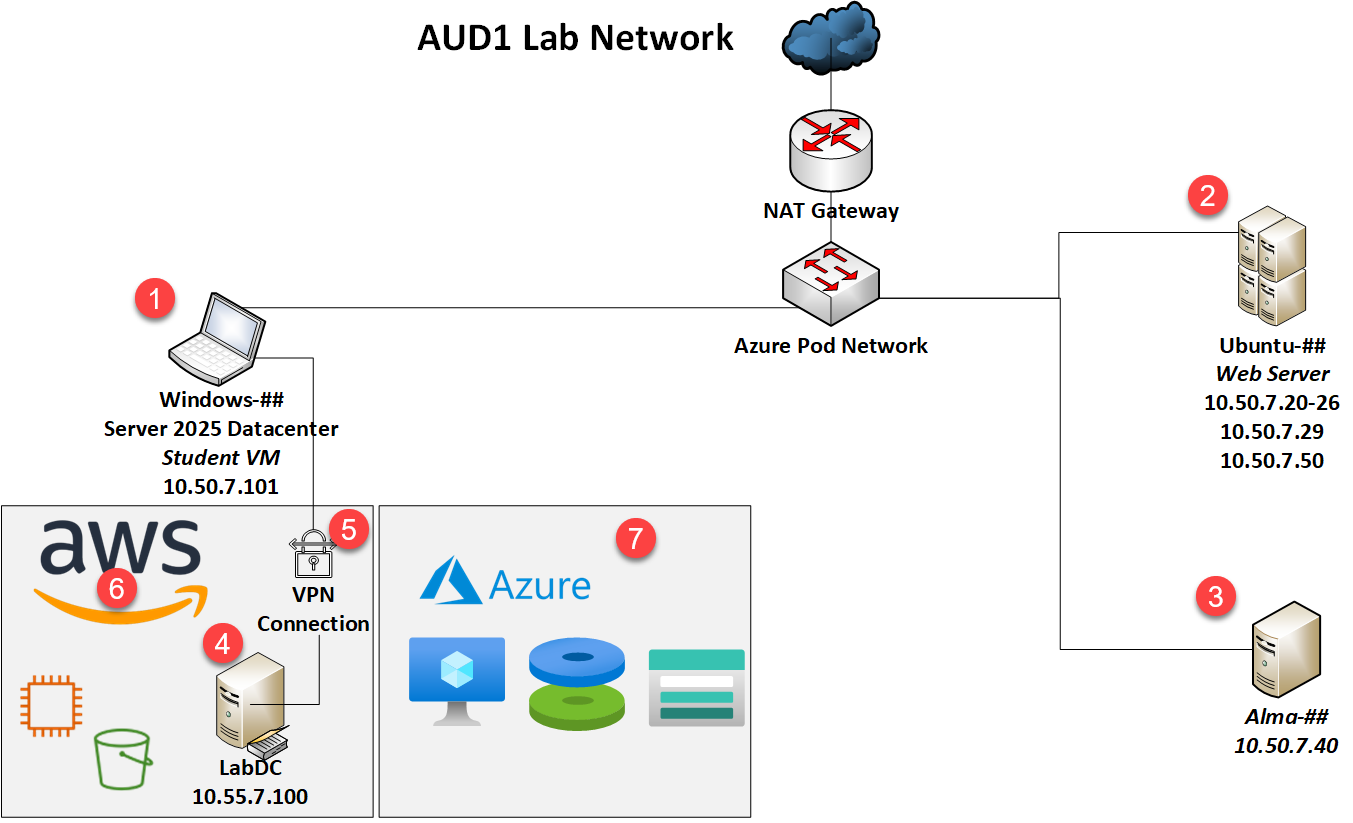
1. Windows
The Windows VM is your audit workstation for the duration of the course. It was provisioned using DevOps techniques (all automated - no manual setup was done before you got the VM), so you'll setup a few audit tools during the early labs. This is the only computer you will need to access from the VMWare console in this class! All other systems will be accessed using tools built into the Windows VM. It's been assigned the internal IP address of 10.50.7.101 and will have another IP unique to your host that is used for NAT (network address translation) access to the internet.
2. Ubuntu
The Ubuntu VM hosts many of the web applications and audit tools used in the course. It's running Kubernetes for hosting multiple web applications, Nginx used as both a web server and a load balancer, the Nessus vulnerability scanner, the NMAP port scanner, and multiple audit tools that run best from a Linux host. It has a NAT interface for internet access and these internal IP addresses:
| IP | Hostname (*.lab.local) | App |
|---|---|---|
| 10.50.7.50 | workbook | Electronic workbook (EWB) |
| 10.50.7.50:8443 | fleet | Fleet DM server |
| 10.50.7.50:3000 | dashboard | Grafana dashboard server for demos |
| 10.50.7.20 | juiceshop | E-commerce web app audited in class |
| 10.50.7.21 | UNUSED | None |
| 10.50.7.22 | bwapp | "Broken web app" for testing/demos |
| 10.50.7.23 | wackopicko | Web app used for testing/demos |
| 10.50.7.24 | dvwa | "Damn vulnerable web application" for testing/demos |
| 10.50.7.25 | UNUSED | None |
| 10.50.7.26 | UNUSED | None |
| 10.50.7.29 | scanner | Nessus vulnerability scanner |
3. Alma
The Alma VM is used mostly as an audit target during the Linux section of the course. It is running the Alma Linux distribution, which is based on RedHat Linux. This allows students to get experience with another major Linux distribution style.
4. DC
DC is a Windows Server 2022 Active Directory server. You'll use this host as a target during your Active Directory auditing in the Windows section of the course. Because it's hosted in the AWS cloud, it requires a VPN to be accessible.
5. VPN
We've provisioned a VPN on a bastion host in AWS and provided a VPN client on the Windows VM to connect to it. The configuration file for the VPN is available for download in your SANS account portal. You'll connect to it during one of the Windows labs.
6. AWS Cloud Environment
You'll perform audits against an AWS cloud environment which contains some EC2 instances (virtual machines), S3 buckets (cloud-based storage), network resources and users with associated policies.
7. Azure Cloud Environment
We also provide an Azure environment with resources the instructor can access for demos. This allows you to understand audit techniques from the command-line and web interface for two major cloud service providers (CSPs).